
How to make a lyric video
Updated
A lyric video shows the words of a song on screen, timed to the singing. This guide explains how to make a lyric video in three ways: yourself in a free video editor, with an automatic AI tool, or with a service that makes the video for your song. Each way costs you something in time, control or money, so here is what you get from each one.
How the AI lyric video generator works
Every step, from your lyrics to the full clip (video in English).
What is a lyric video?
A lyric video is a music video built around the lyrics. The words appear on screen just as they are sung, over a single picture, a loop, or a scene that changes with the song. Artists put them on YouTube and social media. They are easier to produce than a filmed clip, and listeners can sing along.
Three ways to make a lyric video
There is no single best way. The right one depends on how much time you have, how much control you want and how much the look matters.
1. Do it yourself in a free video editor
This works in any editor that has a timeline and text layers. The method is free, and you pay with your time.
- Get the words and their timingWrite the lyrics exactly as they are sung, one line per screen. Play the song and note when each line starts, to about a tenth of a second. A text file or a spreadsheet is enough.
- Pick a backgroundUse your own artwork, a photo, or footage you have the right to use. Choose something calm, or darken it a little, so the text stays readable.
- Type each line and time itAdd a text layer for every line and place it on the timeline. It should appear when the singer starts the line and leave when the line ends. For a three-minute song that is about 40 to 60 layers.
- Check it on a phonePlay the video at phone size with the sound on. Fix any word that arrives late, any line that is too small, and any spelling mistake.
- ExportExport at 16:9, 1080p for YouTube, or 9:16 for Reels, Shorts and TikTok. Watch the exported file once from start to end before you upload it.
What takes the time: typing and timing the lines. A first lyric video for a three-minute song often takes several hours, and every later change to a line means moving it on the timeline again.
Common mistakes:
- Words that arrive late against the singing. Time each line to the moment its first word is sung.
- A font that is hard to read: thin strokes, a busy background or low contrast.
- Text that is too small on a phone. Most people watch on a phone, so test at that size.
- Spelling mistakes and missing marks such as accents or vowel points, which are easy to miss in a long list of lines.
2. An automatic AI tool
You upload a song, and the tool transcribes the words, times them and places them over a template or a generated background. It is fast and needs no editing skill. It suits a quick draft or a casual post.
Where it falls short: the transcription can get words wrong, especially in less common languages, so check every line. The look usually comes from a template, so many videos end up looking alike. Right-to-left languages and diacritics are a frequent weak point. Always read the result before you publish.
3. A service made for your song
A made-for-your-song service such as Milamo takes the opposite route. You upload the song and the lyrics, and the video is made for that song instead of being fitted into a template. At Milamo the pictures are created from the song's own words, the lettering is designed into the scene rather than laid over it, and the timing follows the voice. It works in many languages, each in its own script, including Hebrew from right to left.
It is a paid service, and you choose a style instead of drawing every scene yourself. Before you pay you can see up to 4 different styles, made from your song's words. If you only want a free video, the free editor is the honest answer. If you want a one-of-a-kind look without hours on a timeline, this is worth a look. How it works
What makes a lyric video good
- Readable at phone size: large letters and strong contrast.
- Every word on time, exactly when it is sung.
- One idea per line, so the eye never has to read ahead.
- A look that fits the song and its mood.
- Correct spelling and diacritics in the song's own language.
What you need to start with Milamo
Your song file, your lyrics, and the language of the song. Paste the lyrics, or take the automatic draft and correct it. Timing is then set automatically from the audio, word by word, and you can ask to fix a word or move a line. Upload only songs you own or may use.
Formats: 16:9 and 9:16
Use 16:9 (1920 by 1080) for YouTube and for websites. Use 9:16 (1080 by 1920) for Instagram Reels, YouTube Shorts and TikTok, and keep the text away from the top and bottom edges, where the apps place buttons and captions. Milamo clips are 16:9 today. A vertical 9:16 version is planned as an optional extra and cannot be ordered yet.
Full details: lyric video sizes and formats.
Examples
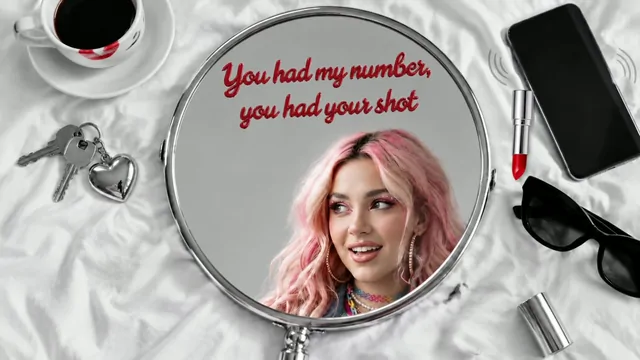
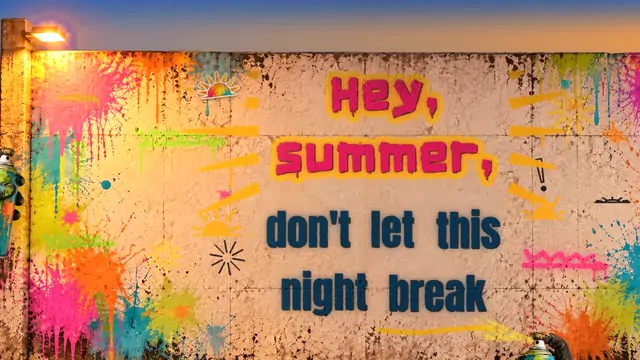
Watch two lyric videos made by Milamo, each created for one song.
Questions people ask
How long does it take to make a lyric video?
In a free editor, a three-minute song often takes several hours the first time, mostly typing and timing the lines. An automatic tool takes minutes, plus the time you need to check and fix the result.
Can I make a lyric video for free?
Yes. Free video editors can do it if you are willing to type and time every line yourself. Some free plans add a watermark or limit the export quality, so check before you start.
What size should a lyric video be?
16:9 at 1920 by 1080 for YouTube, and 9:16 at 1080 by 1920 for Reels, Shorts and TikTok.
Can I make a lyric video for someone else's song?
Only with permission. Platforms can block or remove lyric videos of songs you do not own or license. Use your own songs, or music you have a licence for.
Can I make a lyric video in Hebrew or another right-to-left language?
Yes, but test it first. Some editors reverse the order of Hebrew words or lose the vowel points. Type one line and check it before you continue. Milamo supports Hebrew from right to left, as well as 17 more languages: English, French, Spanish, Portuguese, German, Italian, Dutch, Swedish, Danish, Finnish, Catalan, Indonesian, Polish, Hungarian, Romanian, Czech and Slovak.